Where Bijections, Graphs, and Badminton Hang Out
written: 20 Oct 2026
It began with something roughly like this: “I think you can automate this, probably the lowest hanging fruit,” said Jeron Wong, founder and chief coach of Optimum Badminton Academy. He then walked me through what it took to schedule more than 150 training sessions each week, with up to 15–16 students per session.
OBA’s custom-built CRM already contained placeholder classes, created in advance to reserve coaches’ time slots. Each day, the operations team would:
- Compile the class details for the date 12 days ahead: times, venues, coaches, and class capacities.
- Match each entry to its placeholder class in the CRM.
- Update the class details where necessary.
- Enable the classes for booking.
The routine sounds straightforward. The difficulty was knowing when it was safe to proceed:
- What if the CRM showed 20 training sessions for a date, but the compiled list contained a different number?
- What if the compiled list assigned a coach to overlapping sessions, or left insufficient time to travel between venues?
- What if the compiled list relied on unstated assumptions?
- Alan Tan only teaches at Our Tampines Hub.
- Alan Lim only teaches at Community Hall @ Sprout Hub.
- The list named only “Alan” without a surname for both venues.
Our hour-long conversations always ran over, sometimes stretching to two hours. A simple description of the job would often come with qualifications:
- “Set the class size to X if there are N coaches. But if a coach is a sparring partner, set it to Y.”
- “If the training venues are physically next to each other, we can allow the time slots to be back-to-back.”
And the list went on. I listened, took notes, and asked questions, trying to piece it all together. Often, I ended a conversation a little more lost than before. As I worked through the details afterward, I kept returning to one question: how could I turn all these qualifications into checks the software could enforce? With all the enthusiasm around AI, it was tempting to reach for an LLM. But these scheduling decisions had explicit rules and real consequences when they went wrong:
- Coaches assigned to the wrong sessions
- Courts or coaches double-booked—the CRM did not prevent this
- Training sessions left unavailable for booking
These rules needed explicit, testable checks that would enforce them consistently. I wanted to sleep well at night too! Thus began my journey.
The Job
Instead of manually updating and activating the classes, the operator emails the compiled list to a mailbox the pipeline watches. The pipeline checks it against the CRM, validates the schedule, and carries out the updates and activations.
The Pipeline
The first check is completeness: every entry in the submitted list must match exactly one CRM session, and every CRM session for that date must be accounted for exactly once. That gives us a bijection: one-to-one correspondence between the two sets. If that check fails, the pipeline declines the job. An omitted session could remain unavailable for booking—or be left out of the checks, allowing a clash to go unnoticed.
But accounting for every session doesn’t mean the schedule is valid. What if carrying out the submitted instructions would double-book a coach or a court?
Rejecting the entire list would stop the conflicting changes, but it would also hold up unrelated work. Returning it without explaining the conflicts would leave the operator to untangle the problem.
Finding the clashes
A clash is easy to define once you pick the "resource" that cannot be reserved at the same timeslot:
- a coach cannot teach two sessions at the same time, and needs travel time between venues (unless the venues are next door to each other);
- a court at a venue cannot host two sessions at the same time, though back-to-back sessions on the same court are fine.
So: simulate the submitted changes and group the resulting sessions by resource (each coach, each venue-and-court). Sorting each resource’s sessions by start time makes it easier to check for overlaps and insufficient travel gaps. Projecting the schedule onto a resource “axis” lets us examine each coach’s or court’s timeline separately.
Deciding what stays together
Knowing which sessions clash is not enough. The instructions in one list are not independent: a change may only clash because of another change, and a session moving out of a slot may be exactly what lets another session move in. Apply half of such a set and the schedule is wrong in a new way:
- CHANGE: {VENUE_A, 12-1pm, coaches: [Alan], courts=[1]} -> {VENUE_A, 1-2pm, coaches: [Charlie], courts=[1]}
- CHANGE: {VENUE_A, 1-2pm, coaches: [Alan], courts=[1]} -> {VENUE_A, 2-3pm, coaches: [Alan], courts=[1]}
- ACTIVATE: {VENUE_A, 2-3pm, coaches: [Betty], courts=[1]}
Instructions #2 and #3 compete for the same court at 2pm, so neither can proceed. But rejecting #2 leaves its original 1–2pm session in place. Applying #1 would then double-book that same court at 1pm. All three instructions need to be held back together.
This is where the graph comes in.
- Every instruction is a node, including the "no change" ones, holding the session as it is now and as it would be after the instruction.
- Two instructions are connected when they could interfere: their sessions share a coach or a court at a venue and would overlap, or leave insufficient travel time for a shared coach, in any combination of their before and after states. Sharing a coach is not enough; the sessions have to collide.
- Each connected group is treated as a unit: its instructions go ahead together or are held back together.
- If the proposed schedule contains a clash involving a group, hold that entire group back and return it to the operator with the clashes spelled out. Otherwise, its instructions can proceed together.
A Worked Example
Without leaking too many details, assume the venues are physically apart and the instruction list contains:
- ACTIVATE: {VENUE_C, 2-3pm, coaches: [Alan], courts=[10]}
- ACTIVATE: {VENUE_A, 12-1pm, coaches: [Alan], courts=[1]}
- CHANGE: {VENUE_A, 1-2pm, coaches: [Alan, Betty], courts=[1,2]} -> {VENUE_B, 1-2pm, coaches: [Alan], courts=[1]}
- CHANGE: {VENUE_D, 1-2pm, coaches: [Charlie], courts=[5]} -> {VENUE_C, 1-2pm, coaches:[Charlie], courts=[10]}
How it looks as a graph:
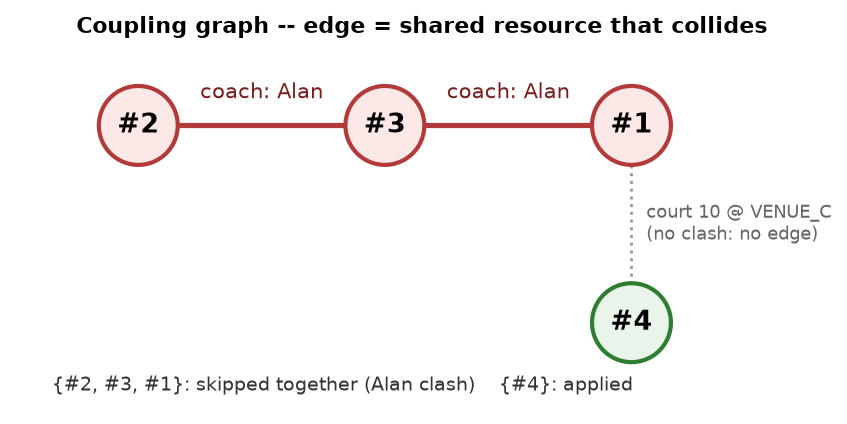
Instruction #3 moves Alan's 1–2pm session from VENUE_A to VENUE_B. Viewed in isolation, that change looks straightforward. The surrounding sessions reveal the problem: Alan is at VENUE_A until 1pm (#2) and at VENUE_C from 2pm (#1), so the move leaves him teaching at three venues with no travel time between them. The clash check flags #3 against both neighbours; the graph says #1, #2 and #3 are one group, so all three are returned to the operator together. Instruction #4 shares court 10 at VENUE_C with #1, but 1–2pm followed by 2–3pm on the same court is fine, so it is not connected to anything and goes straight through to the CRM.
The operator gets their own list back, with each held-back row tagged with the clash it belongs to, so they can see what needs attention, correct the list, and resend it.
The graph decides which changes stay together. The clash check decides whether they can go ahead.
Closing
What began as “the lowest-hanging fruit” turned into an exercise in making everyday judgement explicit. The operations team already knew how to navigate these exceptions. My job was to understand that knowledge well enough to translate it into software, and recognise when the software should hand the problem back. A bijection accounted for the sessions. A graph helped keep related changes together. Both served the same purpose: helping the team get the schedule ready for booking, with less manual work and clearer explanations when something needed attention.
That was our first deployment. It wouldn’t be the last.